Call it “Email Marketing” and your brain quietly files it under marketing, a channel, a campaign, a send.
Call it “Email List Management” and suddenly the question changes. Not “what should we write” but “who are we talking to,” “what do we know about them,” and “are we ready to reach the right one at the right moment?”
That shift in framing greatly impacts your expectations and methods (read strategy). You end up with consistent, compounding results from email instead of wondering why your open rates are dropping.
The way you talk about something shapes the way you do it.
Email Marketing Does Not Mean “We Send Emails”
Most businesses arrive at email marketing with a version of the same mental model: build a list, write good emails, press send. And to be fair, that model isn’t wrong, but it’s just the visible tip of what great email marketing actually is.
The problem is that when “send emails” is the mental model, every problem gets solved at the sending layer:
- Open rates drop? Rewrite the subject line.
- Clicks are low? Try a different CTA.
- Unsubscribes spike? Maybe the content wasn’t good enough.
None of those diagnoses are necessarily wrong. But they are all downstream of a more fundamental question: who is on this list, what do you know about them, and does this email belong in their inbox right now?
When you’re stuck at the sending layer, you keep optimizing the wrong thing. You’re tuning the engine while your map is wrong.
List Management Is The Real Game Of Email Marketing (Here’s What It Is)
What you are really doing when you run email marketing is managing contacts.
That’s it.
And how you manage them is what determines whether the emails you send land or get ignored.
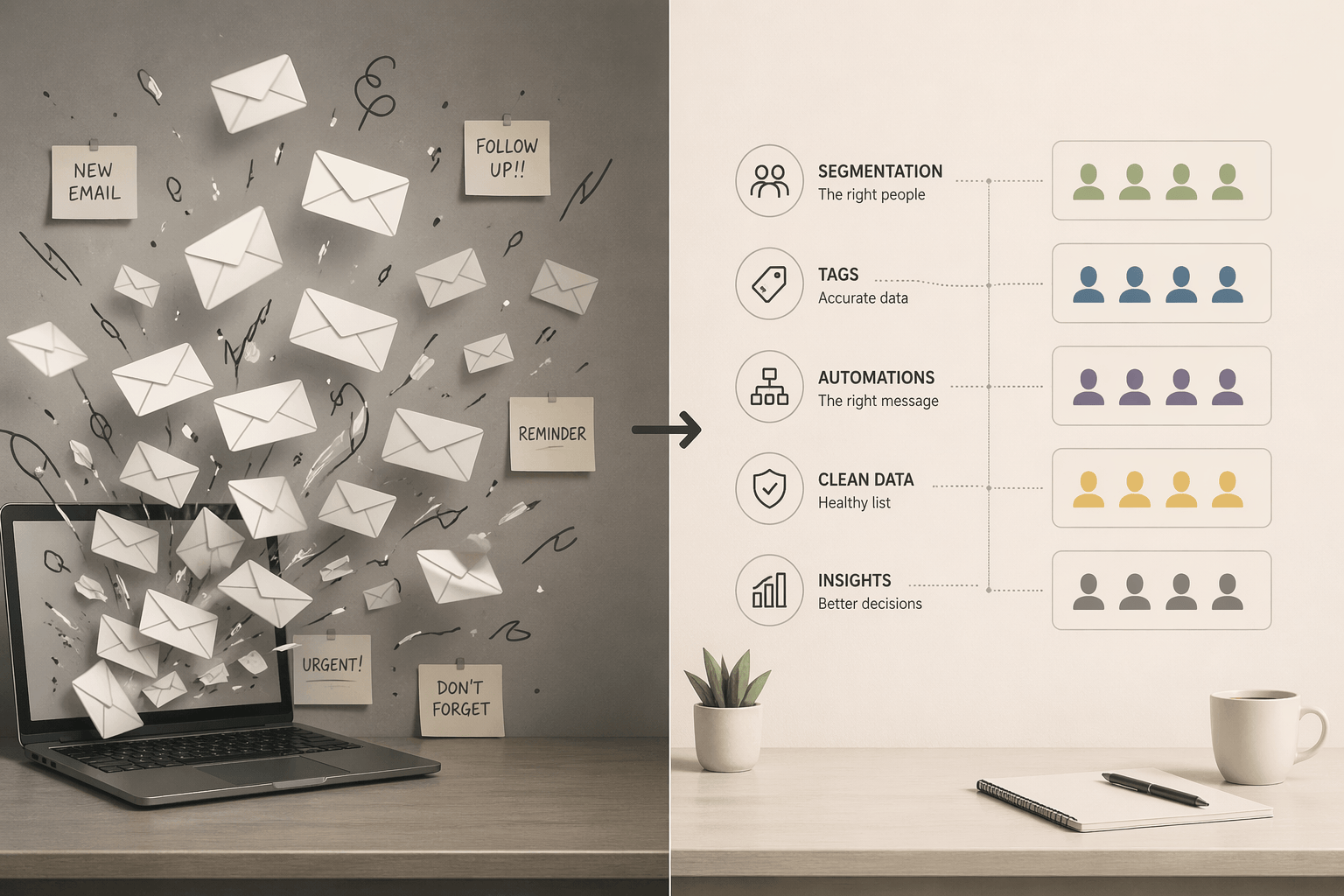
Managing contacts well means:
- Storing them correctly, with the right data fields, source tags, and timestamps that let you actually use what you know about them later
- Segmenting them, not once, but dynamically, so that the right message reaches the right subset at the right time
- Directing them through sequences, automations that do the ongoing work of nurturing, onboarding, or re-engaging without you pressing send each time
- Keeping their data clean and current, so you are not working with a list that is 40% stale addresses and dead accounts
- Syncing information across platforms, so what your CRM knows, your email tool knows too, and nothing falls through the gap between systems
All of that happens before a single email gets written. That is list management, and it’s what makes the email you eventually send feel relevant instead of random. To put it in practical language: it’s what increases open rate.
The components that make this work are surprisingly many: segmentation, data cleansing, opt-in and opt-out management, contact tagging, lead scoring, personalization rules, performance monitoring, tool integrations, and list cleaning. Sounds scary but that’s what automations are for.
And that’s not a feature checklist to look for in your email client. It is a set of decisions YOU make about how to organize and maintain the asset your email strategy runs on.
What Is Email Suppression List Management, and Why You Should Update It Before Your Next Send
A suppression list is the record of contacts who should not receive a given email. This includes:
- unsubscribes
- hard bounces
- spam complaints
- contacts who have been manually excluded for any reason
Most businesses set this up once and forget it.
That is a mistake, for two reasons.
First, a stale or incomplete suppression list is a deliverability risk. Sending emails to contacts who have previously bounced or complained signals to inbox providers that you are not managing your list responsibly, and that signal accumulates quietly until your deliverability takes a visible hit.
Second, regulations in most markets (GDPR, CAN-SPAM, CASL) require that opt-out requests are honored promptly and consistently. If your suppression list is not updated before each send, you are exposed, not hypothetically, but practically, every time you hit send.
“Yes, Nontas, but if I keep updating my suppression list and constantly remove perfectly good emails from my list, the list will shrink.” Here’s an uncomfortable truth for you: it is already shrunken, you just think it isn’t.
Sorry…
What good suppression list management looks like:
- Automated syncing of unsubscribes and bounces-back into your suppression list in real time
- One-click unsubscribe enabled on every email, without friction or confirmation loops
- Suppression lists that are portable, if you move between platforms, the list moves with you
- Regular audits to catch contacts who should be suppressed but are not
5 Best Practices For Your Email List Management, So You Do Not Burn the First Contacts You Collect
The most expensive mistake in email marketing is not a bad campaign. It is a bad foundation, one that means the contacts you work hard to acquire get mishandled from the very start.
So shift your mindset from Email Sender to List Manager. I’m not trying to sound like a motivational speaker here. This is a practical instruction, it changes what you ask and what you build.
Senders ask: what should I write this week?
List managers ask: who on my list is in a position to hear this, and what do they need from me right now?
Senders build content calendars.
List managers build segments, automations, and tagging logic that make the right send obvious when the time comes.
The following practices are not advanced, they’re the baseline. Ignore them and it can get very expensive, very quickly.
1. Start Before You “Have Enough Contacts”
By far the most common list management mistake is waiting. Waiting until the list is bigger, until there is a proper tool in place, until someone has time to set things up properly.
Here is what that waiting actually produces: a contact who signed up six months ago, has never heard from you, and has long since forgotten who you are, why they gave you their email, and whether they want anything from you at all. The moment you finally send, you are not picking up a relationship, you are cold-calling someone who technically opted in.
Your unsubscribes and spam complaints will reflect that.
Starting your list management infrastructure from day one, yes, even with ten contacts, means that by the time you have a thousand, you have a thousand people who know your name. Not a thousand names in a spreadsheet and a deliverability problem waiting to happen.
True story: I had a client who gathered 23,000 contacts before sending their first email. Their “enough contacts” number was… unnatural. I don’t know if I find it greedy, impressive, stupid or all three. Needless to say, their actual list after we tried to re-engage them and updated the Suppression List was much smaller (it was literally less than 2,000 contacts).
2. Name Your Campaigns With a Consistent Formula
This sounds minor. It’s not.
If your campaign naming convention is inconsistent, or nonexistent, your reporting becomes unreadable within six months. You lose the ability to compare performance across sends, identify patterns, or audit what went to whom.
Look at the pattern across everything you manage:
- Campaigns: 2024_Q1_NewYearPromo, 2024_July_SummerSale, 2024_Q2_ProductLaunch
- Tags: 2024_Prospects_Spring, 2024_HighValue_Customers, 2024_Engaged_Contacts
- Automations: AbandonedCart_VIP_Segment, ReEngagement_30Days, PostPurchase_FollowUp
- Lists: 2024_All_Customers, 2024_Leads_Webinar, 2024_Newsletter_Subscribers
- Segments: 2024_Q1_VIP_Customers, 2024_Q2_Inactive_Subscribers, 2024_Repeat_Buyers
- Forms: 2024_Q1_LP_ContactForm, 2024_Event_Registration, 2024_Blog_Signup
The logic is consistent:
[Time_Period]_[Audience/Context]_[The_Specific_Asset/Action]
And that’s just one example of naming. You can choose any structure fits your account and use case best.
Applied consistently, this turns your account history into a navigable record. Without it, you are six months away from a folder full of campaigns named “Newsletter Final FINAL” and segments you are afraid to delete because you no longer know what they contain.
3. Create New Emails, Do Not Resend the Same One
The logic seems sound: a contact did not open the last email, so you resend it with a tweaked subject line and call it a second chance. Many email tools actively encourage this with a “resend to non-openers” button that makes it feel like a best practice.
It’s not, trust me.
Open rates are not a reliable measure of who actually saw your email. A contact might have read the preview, recognized your name, and decided to come back to it, that counts as a non-open. Another might have your emails landing in a tab they check once a week. Resending to “non-openers” means you are making decisions based on incomplete data, and the contacts who did see it are now getting the same email twice, which reads as either disorganization or desperation.
More importantly, every resend is a missed opportunity to add something:
- A new angle
- A follow-up thought
- A different entry point into the same idea
A second email on the same topic is a continuation. It keeps the conversation moving instead of replaying it.
Treat every send as a one-way door. It went out, it did its job or it did not, and now you move forward with a new one. Trust me on this one, your list will notice the difference between a sender who always has something new to say and one who keeps knocking with the same message.
4. Build Automations Once, Let Them Work Forever
The leverage in email list management is not in the campaigns you send, it is in the automations you build once and never have to touch again:
- A well-built welcome sequence
- A re-engagement flow
- A post-purchase follow-up
These are assets. Every contact who enters the list from this point forward moves through them automatically without you having to do anything more no matter how many new contacts you get per day.
That’s the definition of scaling.
5. Start From a Specific Business Goal, Not a Ready-To-Plug-In Template
Templates are useful for execution but they are dangerous as a starting point. When a template is the brief, the email gets written for the template rather than for the business goal. The result is professional-looking content that doesn’t move anyone toward anything.
The correct sequence is this:
Define the business goal → Identify the segment most relevant to that goal → Decide what action you want them to take → Write the email
The template comes last, if at all.
Choose Your Email List Management Software in Context, Not in a Vacuum
There exists no objectively best email list management tool. And this comes from a dedicated superfan of ActiveCampaign.
There exists, though, the tool that fits your specific stack, budget, and workflow. Picking software by looking at feature lists and G2 ratings without considering what it needs to connect to is how businesses end up paying for a platform they use at 20% of its capacity.
Before you evaluate any tool, do three things:
- Inventory your existing tech stack, specifically, what needs to integrate with your email platform: your CRM, your e-commerce system, your landing page builder, your analytics. Integrations are not a bonus feature; they determine whether your contact data is actually complete.
- Define your budget in terms of the full cost, not just the monthly fee, but the setup time, the migration cost if you are moving from something else, and the ongoing management overhead.
- Connect email to your CRM logic, your CRM is the source of truth for contact data. Your email platform should be downstream of it, not parallel to it. If the two systems do not talk, you are managing two versions of the same contact and neither is complete.
If your list is not working the way it should, or you have never set it up properly to begin with, that is exactly what I help with.
Whether you need a full audit of your current ActiveCampaign setup, a done-for-you list management system, or a one-hour session to untangle a specific problem, the starting point is the same: a quick call to understand where you are and what needs to change.